
How Can Troubleshoot the Error 0x80004005 Error When Updating SCCM to Version 2309
Question
Hi All,
Can someone please help me this issue that I am having while trying to upgrade SCCM TO 2309 from 2207?
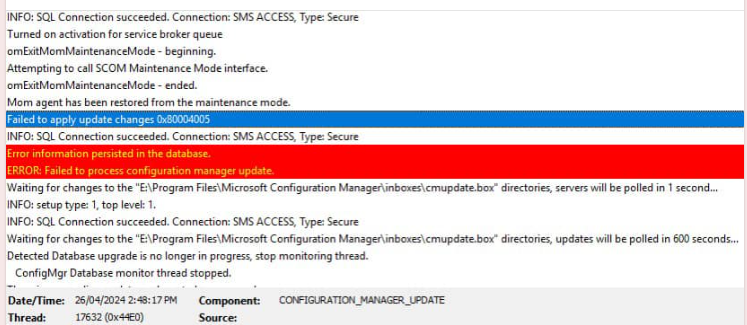
Failed to apply update changes 0x80004005
Error information persisted in the database.
ERROR: Failed to process configuration manager update.
Posted by Prasant Baral in HTMD FB Group

Answers ( 2 )
Replied by André Jansen
Interesting would be to know what are in the other logs.
Replied by Prasant Baral
André Jansen Not sure if this one would help.
FYI, the download for that update was stuck on downloading and it was failing to download the ‘redist’ for the update. I had to download it manually and got way around to trick the SCCM to let me progress to the installation. Not sure if that was the root cause of this issue.
I have found a solution on the internet that says I will need to delete this xxxAMDx64.exe file from the database.
More Details Download SCCM 2309 Early Ring Version using PowerShell Script
https://www.anoopcnair.com/download-sccm-2309-early-ring-version-powershel/#google_vignette
Replied by Anil Bhatt
Check the SQL server is up to date
Replied by Aaron Armstrong
Not much to go on there. Do you have errors prior to that in the log?
Replied by Prasant Baral
Aaron Armstrong Not sure if this one would help.
FYI, the download for that update was stuck on downloading and it was failing to download the ‘redist’ for the update. I had to download it manually and got way around to trick the SCCM to let me progress to the installation. Not sure if that was the root cause of this issue.
I have found a solution on the internet that says I will need to delete this xxxAMDx64.exe file from the database.