
Windows Clock to Auto Set Time Zone Without Granting Location Access to All Apps
Question
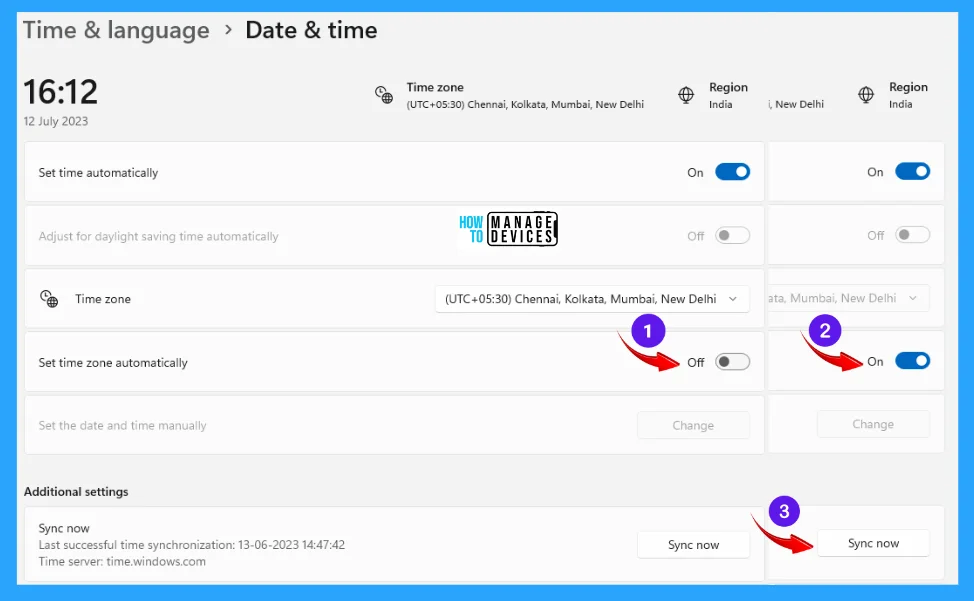
I am looking to set the time zone automatically based on location. We don’t want to allow all apps to access your location, but set specific apps. Is there a way to do it for the built-in Windows clock? I have been googling and haven’t found anything. I did test with forcing, allowing all apps, and that seemed to have worked.
Question Posted by Joe Terracciano in the HTMD FB group

Answers ( 3 )
Replied by Joe Terracciano
Young, thanks, that’s what I set. I think it requires a reboot to change the time zone. My machine doesn’t work properly, so I switched to another system to test on. I am just trying to test what happens when users are on VPN. Is the time going to change?
Replied by Young Choo
Yes.. My bad.. Anything to do with the registry required a restart, Windows.
Although there is another way. But not too complex here.. Just restarting should achieve your requirement..
Replied by Young Choo
If it involved vpn.. Next complexity..
Do consult your blocking/dumb expert to wake up and enable the NTP? And as mentioned.. Hope your certain policies are correct for the NTP as well..
Replied by Joe Terracciano
Young yea, I did it as an application in the hopes that it would install during autopilot, and the time zone is correct when the user logs in. I have to test that next.
Replied by Young Choo
Blocking some unnecessary are the security team’s concern when the security team does not feel the concern. Makes sense?
Replied by Young Choo
Let’s build a brighter future: Our role is to create a better tomorrow.
Replied by Joe Terracciano
Stephen, I made an application to change the registry key with the detection method. I think it’s just my machine probably has some jacked settings for other testing.
Replied by Stephen Monk
Joe Terracciano log script output and make sure it’s working.
Replied by Joe Terracciano
Stephen’s script is working, I see the regkey changes and setting changes. but I think I have something else on my machine. its being rebuilt this weekend, so I am not worried now that I know. So far, my machine is the only one acting strange
Replied by Young Choo
Need to use the registry. Set
HKLMSystemCurrentControlSetServicestzautoupdate and create a 32-bit dword “Start” with value 3.
Hopefully, you do not have other configuration settings that conflict with it. Just a reminder.
As usual. Please try it in a UAT computer before deployment.
For more details – 5 Ways to Manage Automatic Time Zone Changes in Windows 11 – 5 Ways To Manage Automatic Time Zone Changes In Windows 11 HTMD Blog
Replied by Sanjay Mittal
Microsoft does not currently support location-based time zone settings on a per-app basis
Replied by Joe Terracciano
Jai, there is an Intune setting, and in location settings, there is an option to turn it on for specific apps.
Replied by Mike
You can check conditional access,
Replied by Stephen Monk
Yes, I have a script that turns it on. Ask the copilot to help you.
Replied by Joe Terracciano
Stephen, what did you turn on? I have a script to set the time zone automatically to on. then I have a policy that lets apps access your location on.
Replied by Stephen Monk
Joe Terracciano, yes. Force location on and then turn on the auto time zone. Pretty simple.
Replied by Joe Terracciano
Stephen, ok, that’s what I have set already, haven’t seen it work consistently. That’s why I wanted to see if I could force it on for the clock.
Replied by Stephen Monk
Joe Terracciano, you can make a remediation script if something is turning it off. Might have a conflict, or the script didn’t properly apply? Scripts are pretty much one and done. Remediation can be done over and over.