
Setting Up a Policy for Restricted App Access on Azure AD Joined Machines
Question
Hi All,
I need support to set up a policy that allows a user only specific apps like Notepad and Media Player when logging into Azure Ad Joined machine.
Posted by Muhammad Hassan Siddiqui in HTMD FB Group

Answers ( 3 )
Replied by Muhammad Hassan Siddiqui
Hi Andre, we want to allow only Notepad and wmplayer to run for a specific user on all devices.
Replied by David Olvera
And what have you tried so far?
Replied by Muhammad Hassan Siddiqui
David Olvera
I tried to run the startup script on azide ad joined the machine but it didn’t work. Tried device configuration policy but it supports could app
Replied by Andre Williams
Why not Applocker
Replied by Muhammad Hassan Siddiqui
Andre Williams how I can use an Applocker with Intune to allow only notepad and rest of all other apps should block
Replied by Andre Williams
First of all , its custom in this group to say , thankyou for replying can you please give me some info on the topic , then we will take “your” time to help you ,we are not chat gpt… so start again
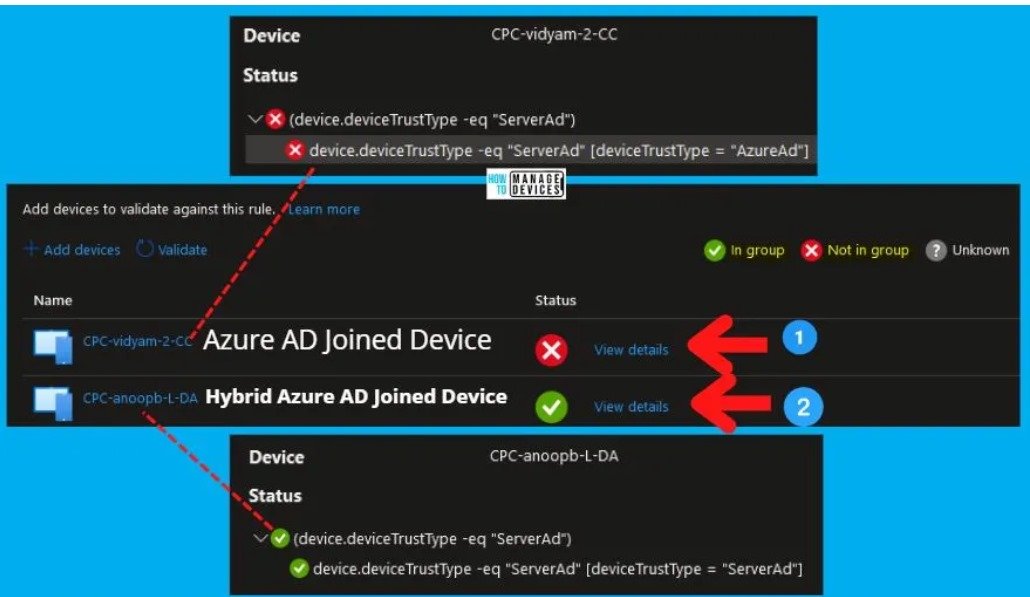
More details Create AAD Dynamic Groups based on Domain Join Type Hybrid Azure AD and Azure AD
https://www.anoopcnair.com/aad-dynamic-groups-hybrid-aad-join-aad-join/
Replied by Joseph Lavallee
You want to look into kiosk mode
Replied by Muhammad Hassan Siddiqui
Joseph Lavallee can you please share some information about kiosk mouse
Replied by Muhammad Hassan Siddiqui
Joseph Lavallee actually we want a user xyz can login on any azure ad joined system and run only notepad and window media player
Replied by Doug Johnson
Muhammad Hassan Siddiqui don’t listen to this comment. This was terrible advice.