
Device Fully Encrypted with BitLocker but Still Showing Non-Compliant
Question
Hi All,
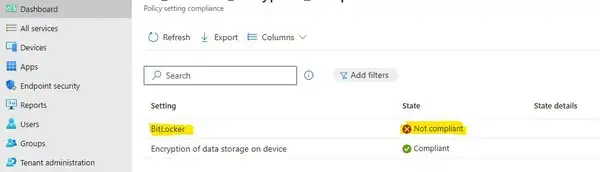
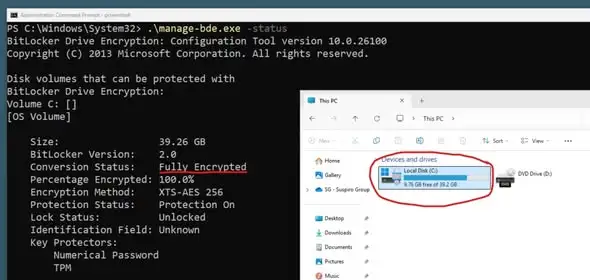
My device shows fully encrypted with BitLocker, but it’s still marked as “BitLocker non-compliant” in the compliance policy. Does anyone know why this might be happening? Do you have any ideas?
Posted by Akter Hossain in HTMD FB group

Answers ( 5 )
Replied by Rudy Ooms
Did you even reboot the device to ensure the updated DHA data was sent over to the service?
Device health attestation is way more complicated than you think it is when looking at the inside… explaining it all here and also why that reboot is necessary
Replied by Akter Hossain
Rudy Ooms Thanks very much! This looks like a great resource to dive into. I’ll check it out soon and update this post if I make any progress.
Replied by Luis Treviño
How can we get this to up date within the hour? I have new hires coming Monday and have seen this issue happen before. Our condition access policy alerts us and locks out the User unit it’s fixed. Any trick to do on the endpoint to get the audit to sent the new information up to InTune faster?
Replied by Anup Adhikari
Please check if there are multiple policies applied to same user or device, and check how many of the policies has bitlocker configured.
Replied by Brett Lock
Open edge type intunemanagementextension://synccompliance see if it helps
Replied by Ryan Matthew
I would recommend a fresh start remote action as this will typically resolve these types of issues. You should especially do a fresh start if it’s for a new user.
Replied by Caenapo Sanada
No worries. It takes time to be updated. In my case, it took nearly a week.
Replied by Corey Pottebaum
Have you rebooted after BitLocker was enabled? The state of this setting is only measured at boot time.
Replied by Mohd Raimy
Based on exp, some machines DHA are corrupted (the registry). Not sure how to fix that. But the workaround is to create another compliance policy to only “Encryption of data storage on device “ without the “Bitlocker”. If this policy works, then its confirmed the DHA corrupted thus it “doesnt” report back as Bitlocker encrypted.
Replied by Morten Wiingreen
That is also why we have set compliance policy to 7 days before marking device compliance
Replied by Akter Hossain
Morten Wiingreen Secure Boot is enabled and marked as compliant. The only issue is with the Bitlocker.
Replied by Morten Wiingreen
Strange. When you sync from company portal, does the OMA client begin to use resources?
Replied by Akter Hossain
Morten Wiingreen Yes, here you go
Replied by Nguyễn Minh Hiếu
I think the “Encryption Method” is a mismatch.
For more details, Bitlocker Unlocked with Joy – Behind the Scenes Windows 10 – Part 1- https://www.anoopcnair.com/bitlocker-unlocked-behind-the-scenes-windows-10/
Replied by Morten Wiingreen
In my experience, it’s a synchronization issue. Restarting the device should force a sync and update the device status. However, the Intune reports are slow to update—they could take hours.
Replied by Akter Hossain
Morten Wiingreen Thanks. I’ve set a half-day delay, but it’s not getting compliant even after 3 days.
Replied by Morten Wiingreen
Akter Hossain, do you have other requirements in the compliance policy besides Bitlocker? We also have a secure boot. Could it be something like that?