
Issue with Approving Android Managed Google Play Apps in Microsoft Intune
Question
Hi All,
I am trying to add Android Managed Google Play App through Microsoft Intune.
I refer instructions from web, Microsoft KBs and YouTube.
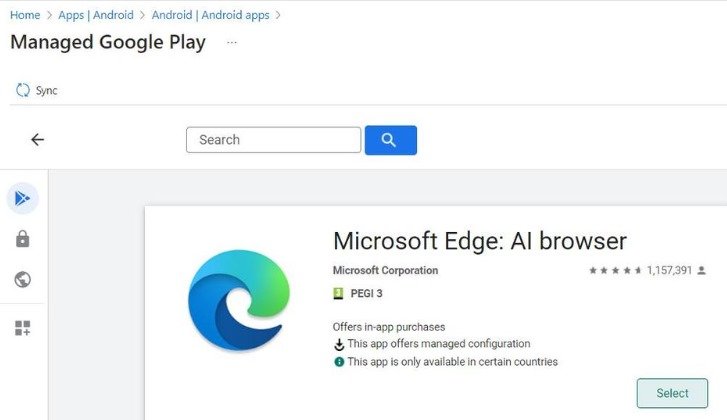
I have navigated to the Managed Google Play and choose an App as per instructions. Next, it says to select “Approve”. But I can see only “Select” button instead of Approve, and when I click on select, nothing happens.
I tried different Apps; it seems like the same for all.
Could you please suggest me how can I proceed?
Posted by Joseph K in HTMD FB Group

Answers ( 2 )
Replied by Joseph K
Bartosz Minder will check.
Replied by David Olvera
I had the same issue but after few minutes it worked, it seems to work faster if you login directly to the managed android store
Replied by Joseph K
David Olvera I tried a few times. Still, let me check it after sometime.
Replied by John Omar Pol
You need to click Sync
Replied by Joseph K
John Omar Pol I’ll check it tonight after getting home.
Replied by Bartosz Minder
Just click on Select and then Sync at the top. Apps will be available on the list in a couple OD minutes.